Internal Modules
Configuration › CRM
Every module picks a Source Type when it's created, and that choice can't change afterward. Internal is one of the two options, and the default: records are created and managed entirely inside this system, in its own database.
- Nearly every module is Internal: all 11 built-in modules, Attachments, Campaign Uploads, Comments, Contacts, Disposition, Groups, Leads, Organizations, Telephony, Tickets, and Users, are Internal, along with any module created directly, like
Productsused throughout this guide. - The full field builder is available: all 13 field types, layouts, dependencies, and relationships to other modules can be configured freely, with nothing held back.
- No external dependency: the module works on its own the moment it's saved, with no separate integration or endpoint to wire up first.
- The default choice: Internal is already selected when a new module form opens, so nothing needs to be picked to keep it.
Setting It
Source Type sits on the new module form, alongside Module Name, Description, and Icon. Internal is selected from the moment the form opens.
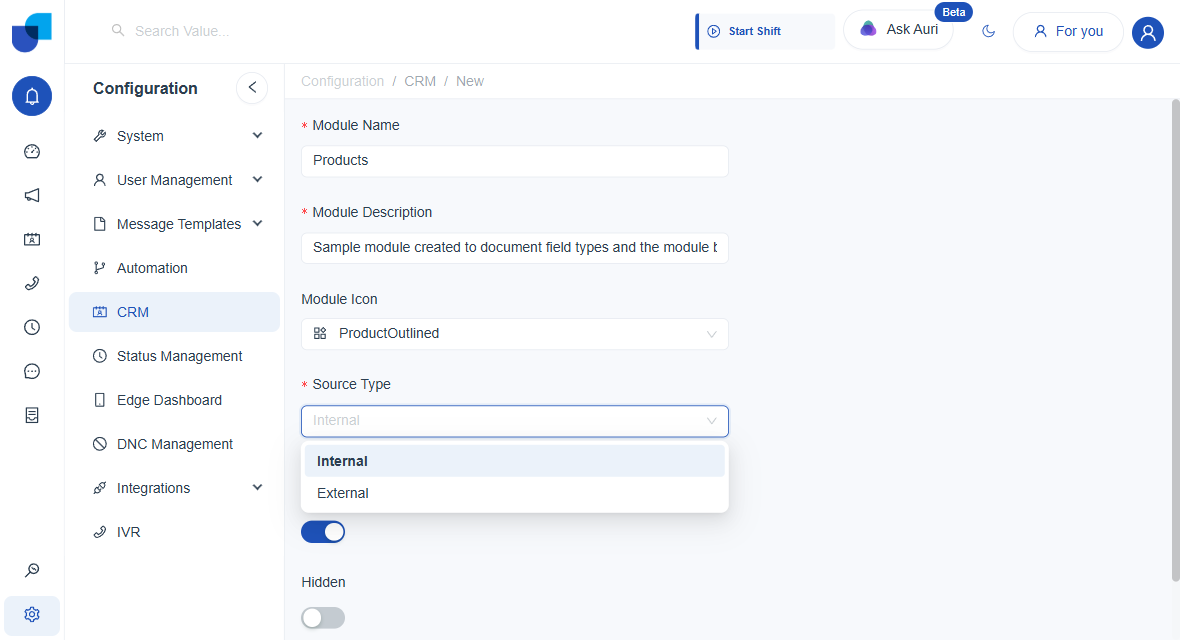 The Source Type dropdown on a new module: Internal is the default, and stays selected unless External is chosen instead.
danger
Source Type is locked in the moment the module is saved. Switching an Internal module to External later, or the other way around, is not possible; the module has to be recreated instead.